Atlas - BUILD.cmake.md
Home / ext / SDL / src / hidapi Rendered HTML view | Size: 15945 bytes [Download] [Show on GitHub] [Search similar files] [Raw] [Raw (proxy)]Building HIDAPI using CMake
To build HIDAPI with CMake, it has to be installed/available in the system.
Make sure you've checked prerequisites and installed all required dependencies.
HIDAPI CMake build system allows you to build HIDAPI in two generally different ways: 1) As a standalone package/library; 2) As part of a larger CMake project.
TL;DR: if you're experienced developer and have been working with CMake projects or have been written some of your own - most of this document may not be of interest for you; just check variables names, its default values and the target names.
Installing CMake
CMake can be installed either using your system's package manager, or by downloading an installer/prebuilt version from the official website.
On most *nix systems, the preferred way to install CMake is via package manager,
e.g. sudo apt install cmake.
On Windows CMake could be provided by your development environment (e.g. by Visual Studio Installer or MinGW installer), or you may install it system-wise using the installer from the official website.
On macOS CMake may be installed by Homebrew/MacPorts or using the installer from the official website.
Standalone package build
To build HIDAPI as a standalone package, you follow general steps of building any CMake project.
An example of building HIDAPI with CMake: ```sh
precondition: create a somewhere on the filesystem (preferably outside of the HIDAPI source)
this is the place where all intermediate/build files are going to be located
cd
configure the build
cmake
build it!
cmake --build .
install library; by default installs into /usr/local/
cmake --build . --target install
NOTE: you need to run install command as root, to be able to install into /usr/local/
``` Such invocation will use the default (as per CMake magic) compiler/build environment available in your system.
You may pass some additional CMake variables to control the build configuration as -D<CMake Variable>=value.
E.g.:
```sh
install command now would install things into /usr
cmake
Using a specific CMake generator
An example of using `Ninja` as a CMake generator: ```sh cdSome of the standard CMake variables you may want to use to configure a build:
CMAKE_INSTALL_PREFIX- prefix whereinstalltarget would install the library(ies);CMAKE_BUILD_TYPE- standard possible values:Debug,Release,RelWithDebInfo,MinSizeRel; Defaults toReleasefor HIDAPI, if not specified;BUILD_SHARED_LIBS- when set to TRUE, HIDAPI is built as a shared library, otherwise build statically; Defaults toTRUEfor HIDAPI, if not specified;
macOS-specific variables
- [`CMAKE_FRAMEWORK`](https://cmake.org/cmake/help/latest/variable/CMAKE_FRAMEWORK.html) - (since CMake 3.15) when set to TRUE, HIDAPI is built as a framework library, otherwise build as a regular static/shared library; Defaults to `FALSE` for HIDAPI, if not specified; - [`CMAKE_OSX_DEPLOYMENT_TARGET`](https://cmake.org/cmake/help/latest/variable/CMAKE_OSX_DEPLOYMENT_TARGET.html) - minimum version of the target platform (e.g. macOS or iOS) on which the target binaries are to be deployed; defaults to a maximum supported target platform by currently used XCode/Toolchain;HIDAPI-specific CMake variables:
HIDAPI_BUILD_HIDTEST- when set to TRUE, build a small test applicationhidtest;HIDAPI_WITH_TESTS- when set to TRUE, build all (unit-)tests; currently this option is only available on Windows, since only Windows backend has tests;
Linux-specific variables
- `HIDAPI_WITH_HIDRAW` - when set to TRUE, build HIDRAW-based implementation of HIDAPI (`hidapi-hidraw`), otherwise don't build it; defaults to TRUE; - `HIDAPI_WITH_LIBUSB` - when set to TRUE, build LIBUSB-based implementation of HIDAPI (`hidapi-libusb`), otherwise don't build it; defaults to TRUE; **NOTE**: at least one of `HIDAPI_WITH_HIDRAW` or `HIDAPI_WITH_LIBUSB` has to be set to TRUE.To see all most-useful CMake variables available for HIDAPI, one of the most convenient ways is too use cmake-gui tool (example).
NOTE: HIDAPI packages built by CMake can be used with pkg-config, as if built with Autotools.
MSVC and Ninja
It is possible to build a CMake project (including HIDAPI) using MSVC compiler and Ninja (for medium and larger projects it is so much faster than msbuild).
For that:
1) Open cmd.exe;
2) Setup MSVC build environment variables, e.g.: vcvarsall.bat x64, where:
- vcvarsall.bat is an environment setup script of your MSVC toolchain installation;
For MSVC 2019 Community edition it is located at: C:\Program Files (x86)\Microsoft Visual Studio\2019\Community\VC\Auxiliary\Build\;
- x64 -a target architecture to build;
3) Follow general build steps, and use Ninja as a generator.
Using HIDAPI in a CMake project
When HIDAPI is used as a standalone package (either installed into the system or built manually and installed elsewhere), the simplest way to use it is as showed in the example:
```cmake project(my_application)
add_executable(my_application main.c)
find_package(hidapi REQUIRED) target_link_libraries(my_application PRIVATE hidapi::hidapi) ```
If HIDAPI isn't installed in your system, or find_package cannot find HIDAPI by default for any other reasons,
the recommended way manually specify which HIDAPI package to use is via hidapi_ROOT CMake variable, e.g.:
-Dhidapi_ROOT=<path to HIDAPI installation prefix>.
NOTE: usage of hidapi_ROOT is only possible (and recommended) with CMake 3.12 and higher. For older versions of CMake you'd need to specify CMAKE_PREFIX_PATH instead.
Check with find_package documentation if you need more details.
Available CMake targets after successful find_package(hidapi):
- hidapi::hidapi - indented to be used in most cases;
- hidapi::include - if you need only to include <hidapi.h> but not link against the library;
- hidapi::winapi - same as hidapi::hidapi on Windows; available only on Windows;
- hidapi::darwin - same as hidapi::hidapi on macOS; available only on macOS;
- hidapi::libusb - available when libusb backend is used/available;
- hidapi::hidraw - available when hidraw backend is used/available on Linux;
NOTE: on Linux often both hidapi::libusb and hidapi::hidraw backends are available; in that case hidapi::hidapi is an alias for hidapi::hidraw. The motivation is that hidraw backend is a native Linux kernel implementation of HID protocol, and supports various HID devices (USB, Bluetooth, I2C, etc.). If hidraw backend isn't built at all (hidapi::libusb is the only target) - hidapi::hidapi is an alias for hidapi::libusb.
If you're developing a cross-platform application and you are sure you need to use libusb backend on Linux, the simple way to achieve this is:
cmake
if(TARGET hidapi::libusb)
target_link_libraries(my_project PRIVATE hidapi::libusb)
else()
target_link_libraries(my_project PRIVATE hidapi::hidapi)
endif()
HIDAPI as a subdirectory
HIDAPI can be easily used as a subdirectory of a larger CMake project: ```cmake
root CMakeLists.txt
cmake_minimum_required(VERSION 3.4.3...3.25 FATAL_ERROR)
add_subdirectory(hidapi) add_subdirectory(my_application)
my_application/CMakeLists.txt
project(my_application)
add_executable(my_application main.c)
NOTE: no find_package is required, since HIDAPI targets are already a part of the project tree
target_link_libraries(my_application PRIVATE hidapi::hidapi) ``` Lets call this "larger project" a "host project".
All of the variables described in standalone build section can be used to control HIDAPI build in case of a subdirectory, e.g.:
cmake
set(HIDAPI_WITH_LIBUSB FALSE) # surely will be used only on Linux
set(BUILD_SHARED_LIBS FALSE) # HIDAPI as static library on all platforms
add_subdirectory(hidapi)
NOTE
If you project happen to use `BUILD_SHARED_LIBS` as a `CACHE` variable globally for you project, setting it as simple variable, as showed above _will have not affect_ up until _CMake 3.13_. See [CMP0077](https://cmake.org/cmake/help/latest/policy/CMP0077.html) for details.There are several important differences in the behavior of HIDAPI CMake build system when CMake is built as standalone package vs subdirectory build:
1) In standalone build a number of standard and HIDAPI-specific variables are marked as cache variables or options.
This is done for convenience: when you're building HIDAPI as a standalone package and using tools like cmake-gui - those are highlighted as variables that can be changed and has some short description/documentation. E.g.:
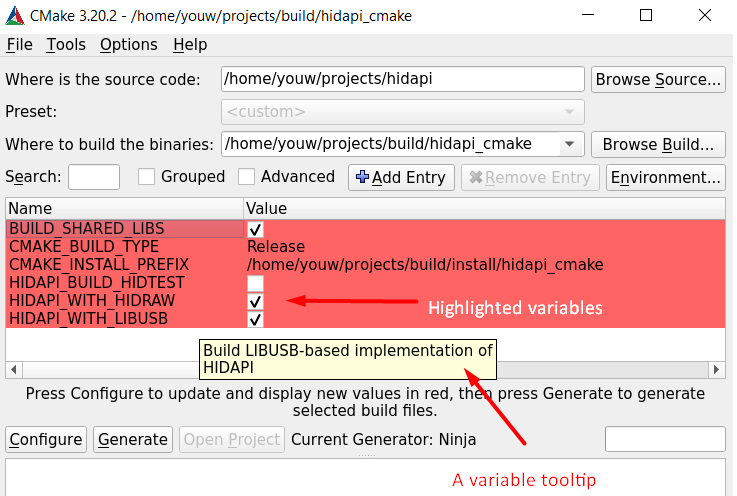
E.g.2:
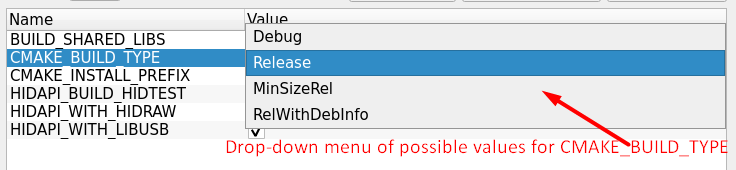
When HIDAPI is built as a subdirectory - none of the variables are marked for cache or as options by HIDAPI.
This is done to let the host project's developer decide what is important (what needs to be highlighted) and what's not.
2) The default behavior/default value for some of the variables is a bit different:
- by default, none of HIDAPI targets are installed; if required, HIDAPI targets can be installed by host project after including HIDAPI subdirectory (requires CMake 3.13 or later); or, the default installation can be enabled by setting HIDAPI_INSTALL_TARGETS variable before including HIDAPI subdirectory.
HIDAPI uses GNUInstallDirs to specify install locations. Variables like CMAKE_INSTALL_LIBDIR can be used to control HIDAPI's installation locations. E.g.:
cmake
# enable the installation if you need it
set(HIDAPI_INSTALL_TARGETS ON)
# (optionally) change default installation locations if it makes sense for your target platform, etc.
set(CMAKE_INSTALL_LIBDIR "lib64")
add_subdirectory(hidapi)
- HIDAPI prints its version during the configuration when built as a standalone package; to enable this for subdirectory builds - set HIDAPI_PRINT_VERSION to TRUE before including HIDAPI;
3) In a subdirectory build, HIDAPI doesn't modify or set any of the CMake variables that may change the build behavior. For instance, in a standalone build, if CMAKE_BUILD_TYPE or BUILD_SHARED_LIBS variables are not set, those are defaulted to "Release" and "TRUE" explicitly. In a subdirectory build, even if not set, those variables remain unchanged, so a host project's developer has a full control over the HIDAPI build configuration.
Available CMake targets after add_subdirectory(hidapi) are the same as in case of standalone build, and a few additional ones:
- hidapi_include - the interface library; hidapi::include is an alias of it;
- hidapi_winapi - library target on Windows; hidapi::winapi is an alias of it;
- hidapi_darwin - library target on macOS; hidapi::darwin is an alias of it;
- hidapi_libusb - library target for libusb backend; hidapi::libusb is an alias of it;
- hidapi_hidraw - library target for hidraw backend; hidapi::hidraw is an alias of it;
- hidapi-libusb - an alias of hidapi_libusb for compatibility with raw library name;
- hidapi-hidraw - an alias of hidapi_hidraw for compatibility with raw library name;
- hidapi - an alias of hidapi_winapi or hidapi_darwin on Windows or macOS respectfully.
Advanced:
- Why would I need additional targets described in this section above, if I already have alias targets compatible with find_package?
- an example:
cmake
add_subdirectory(hidapi)
if(TARGET hidapi_libusb)
# see libusb/hid.c for usage of `NO_ICONV`
target_compile_definitions(hidapi_libusb PRIVATE NO_ICONV)
endif()
Both Shared and Static build
If you're a former (or present) user of Autotools build scripts for HIDAPI, or you're a package manager maintainer and you're often working with those - you're likely asking how to build HIDAPI with CMake and get both Shared and Static libraries (as would be done by Autotools: ./configure --enable-static --enable-shared ...).
CMake doesn't have such option of-the-box and it is decided not to introduce any manual CMake-level workarounds for HIDAPI on this matter.
If you want to mimic the Autotools behavior, it is possible by building/installing first the static version of the library and then shared version of the library. The installation folder (CMAKE_INSTALL_PREFIX) should point to the same directory for both variants, that way:
- both static and shared library binaries will be available and usable;
- a single header file(s) for both of them;
- Autotools/pkg-config (.pc) files will be generated and usable as if generated by Autotools natively and build configured with both -enable-static --enable-shared options;
- CMake package scripts will be generated and fully usable, but only the last build installed, i.e. if the last was installed Shared version of the binary - CMake targets found by find_package(hidapi) would point to a Shared binaries.
There is a historical discussion, why such solution is simplest/preferable: https://github.com/libusb/hidapi/issues/424
TL;DR/Sample
```sh
First - configure/build
Static libraries
cmake -S
Shared libraries
cmake -S
(Optionally) change the installation destination.
NOTE1: this is supported by CMake only on UNIX platforms
See https://cmake.org/cmake/help/latest/envvar/DESTDIR.html
NOTE2: this is not the same as CMAKE_INSTALL_PREFIX set above
NOTE3: this is only required if you have a staging dir other than the final runtime dir,
e.g. during cross-compilation
export DESTDIR="$STAGING_DIR"
Install the libraries
NOTE: order of installation matters - install Shared variant the last
Static libraries
cmake --install "
Shared libraries
cmake --install "
```